What is a WACZ file? How verifiable web archives work
WACZ is the file format behind verifiable web archives. What's inside one, how it builds on WARC, and how signing proves a capture hasn't changed.
A WACZ (Web Archive Collection Zipped) file is a web page saved in its entirety, in a single file that includes a table of contents and its own proof. You can open it from your filesystem, replay the page as it looked, and, if it was signed, check that nobody has touched it since.
It's pronounced "wac" (like "mac") – "zee". We've used that word a lot recently, but we've never stopped to explain it. So here it goes, and we thank our friends at Webrecorder for the format.
Why not just save the page?
Saving a page as a PDF or a screenshot gives you a snapshot of it. Grabbing the code for it (the HTML) gives you a skeleton with the images and styles left behind, still pointing at a server that may no longer answer.
A "proper" web archive does even better : it records the conversation between your browser and the website and grabs very request / response, the headers, the HTML, the images, the scripts – everything. Later, a viewer can replay that conversation and rebuild the page, links and all, without going back to the live site.
That fidelity is what makes it evidence-grade. I wrote about why screenshots fall short; a web archive is the answer to that problem.
A short primer on WARC
WACZ is in fact a wrapper (an improvement?) over an older file format: the WARC. Rhymes with "orc."
WARC (Web ARChive) is the standard container for recorded web traffic. It's been around since the early 2000s, it became an international standard (ISO 28500), and it's what the Internet Archive and national libraries use to preserve the web at scale.
Roughly speaking, a WARC file is a long list of records stacked one after another: here is the request we made, here is the response we got, here is when, and here is where it came from.
It's excellent at preservation. It was designed for archivists crawling billions of pages, and it does that job very well. What it was not designed for is using a single capture afterwards:
- A WARC has no index. To find one URL, a viewer has to read through the file.
- A WARC has no overall description of what's in it, or who made it.
- A WARC has no built-in way to prove that it's unchanged.
These are precisely the gaps identified and filled by the WACZ format.
WACZ vs WARC: what's the difference?
| WARC | WACZ | |
|---|---|---|
| What it is | A raw recording of web traffic | A ZIP package that wraps one or more WARC files |
| Index | None: a viewer reads through the file | Yes, in indexes/ |
| Describes its contents | No | Yes: a list of pages and a manifest |
| Tamper evidence | Not built in | Hashes of every file, plus an optional signature |
| Opening a capture | Reads the whole file | Reads only the pieces needed |
| Typical use | Crawling the web at scale | Sharing, replaying and keeping evidence |
What's inside a WACZ file
A WACZ is a ZIP file with a fixed layout. You can swap the file extension to .zip and unarchive it to look around. This is the structure, which Starling Lab's diagram below shows nicely:
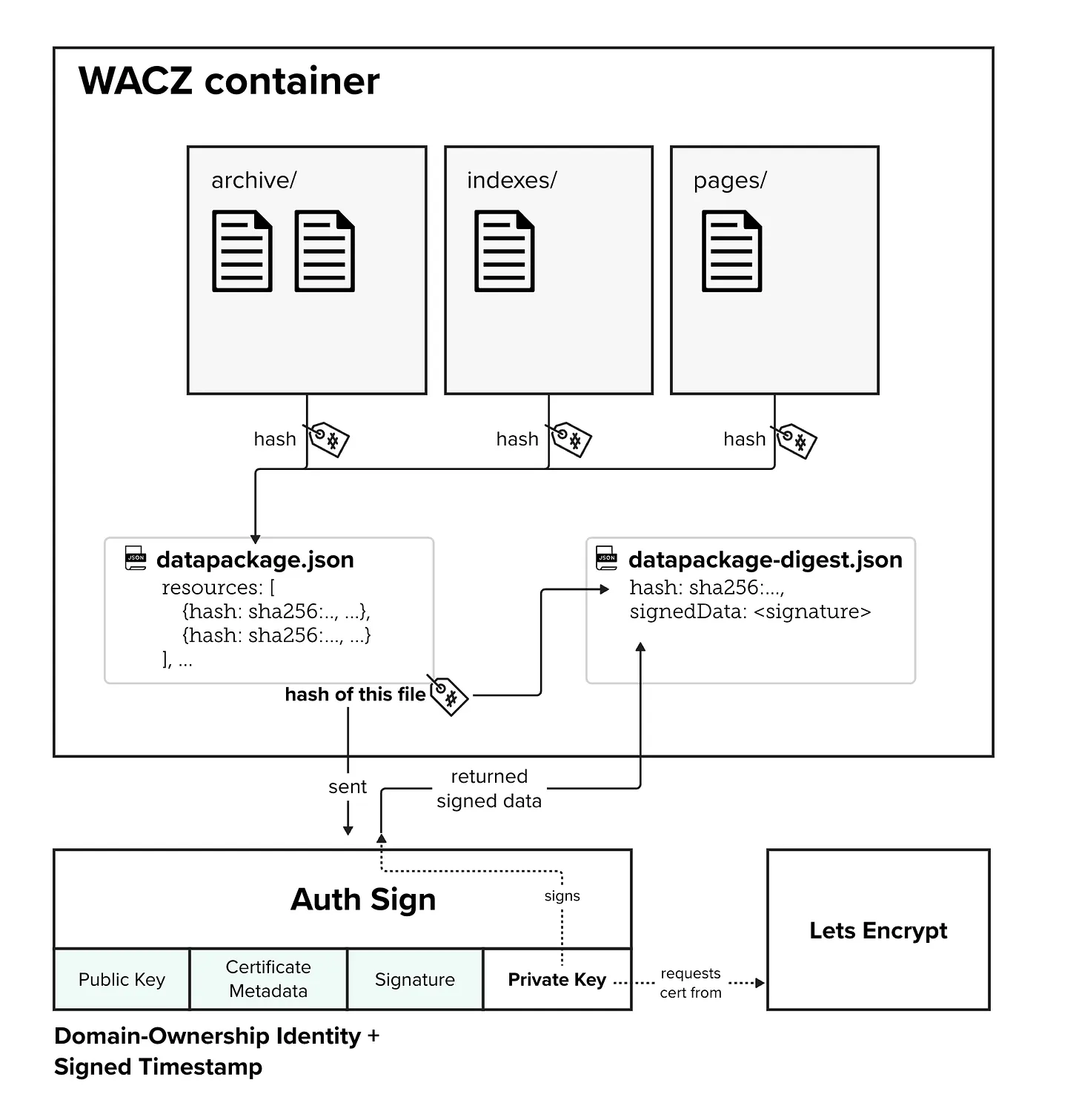
Diagram courtesy of Starling Lab.
archive/holds the WARC file or files: the recorded traffic, the actual content of the capture.indexes/holds an index of every URL in the archive and where to find it, so a viewer can jump straight to what it needs.pages/lists the pages that were captured on purpose, as opposed to the images and scripts loaded along the way, with their titles and timestamps.datapackage.jsonis the manifest. It lists every file in the container along with its cryptographic hash, a fingerprint that changes if even one byte does.datapackage-digest.jsonis where the proof lives. It stores a hash of the manifest and, when the archive is signed, the signature.
Two things follow from that design
- It's portable. One file, no server to run. You can email it, store it on a drive, put it on a USB stick for a lawyer.
- It's fast. Because of the indexes, a viewer such as ReplayWeb.page doesn't need to unpack the whole archive; it reads only the pieces required to show the requested page. A capture of a heavy page with video can open in seconds.
What about the proofs?
- Every folder's contents are hashed, and those hashes are written into
datapackage.json. - That manifest is then hashed as well. Conversely: change any file in the archive and its hash no longer matches the manifest; change the manifest to hide it, and the manifest's own hash no longer matches.
- The manifest's hash can be sent to a signing service, which signs it with a private key and sends back the signature. That signature goes into
datapackage-digest.json.
Yes, it's a chain: the content is pinned by hashes, the hashes are pinned by the manifest, and the manifest is pinned by a signature. If you've got the file, you can run the check.
The usual caveat: signing doesn't, on its own, prove that the page was telling the truth, or that it was captured in a clean environment. That's why the habits around the capture matter too: see why every investigation should start with an empty browser.
Signatures prove that the file hasn't changed since it was signed, and that a particular party signed it at a particular time.
Here's a second take from my former Starling Lab colleague Lindsay's write up Authenticated Web Archives: WACZ Files, which covers the format and how archives move through the Lab's authentication pipeline, where captures are signed once by the capture tool and again by Starling Lab. It's where the diagram above comes from.
How to open a WACZ file
You don't need an account or special software to look at one.
- Replay it in your browser. Go to ReplayWeb.page, choose your
.waczfile, and the page comes back as it was captured. The file is read in your browser, nothing is uploaded. - Look inside it. Rename
file.wacztofile.zipand unzip it: you'll find the folders and JSON files described above. - Validate it. The command-line tool py-wacz can create and validate WACZ files.
- Open it in evidx. Captures made with evidx replay in the app, alongside their audit log.
Where you'll meet WACZ files
- Browsertrix and ArchiveWeb.page, from Webrecorder, are the tools that created the format and still define it. One crawls sites in the cloud, the other captures from your own browser.
- evidx captures every page as a signed WACZ, adds a timestamp, and keeps a signed chain-of-custody log of everything that happens to it afterwards. Our step-by-step guide shows the workflow.
- Libraries, archives and research groups increasingly store web collections as WACZ because it's so easy to host and replay.
More resources:
- WACZ specification, by Webrecorder. The definitive reference for the structure described above.
- Authenticated Web Archives: WACZ Files, by Lindsay Walker and Starling Lab. A readable introduction to signing and verification.
- ReplayWeb.page. Drop a WACZ file into your browser and watch the page come back. Nothing is uploaded.
- WARC format specification, maintained by the International Internet Preservation Consortium. The layer underneath.
- Webrecorder, the project behind WACZ, Browsertrix and ArchiveWeb.page.
- py-wacz, a command-line tool to create and validate WACZ files.
- Starling Lab on GitHub, with examples of embedding and authenticating archives.
- And for why any of this matters in a newsroom or a courtroom, start with Your screenshot won't survive a legal challenge.